If you’re an IoT remote water meter customer working with our team, or even a property manager, municipal administrator, or small business owner trying to cut waste and avoid unexpected utility bills, you’ve probably wondered: How do I actually stop overusing water without being tied to manual meter checks or constant back-and-forth with utility providers? For years, managing water usage meant waiting for a bi-monthly bill that told you how much you wasted weeks after the fact, or hiring someone to trudge through basements and crawl spaces to read a mechanical meter. Now, with IoT remote water meters (that’s what we build and sell at our company), you get real-time data at your fingertips—but that data only works if you actually use it to set boundaries that fit your needs. This guide is written like I’m sitting across from you at our office break room, coffee in hand, walking through exactly how we help our clients set up usage limits, no confusing jargon or complicated hoops to jump through. IoT Remote Water Meter
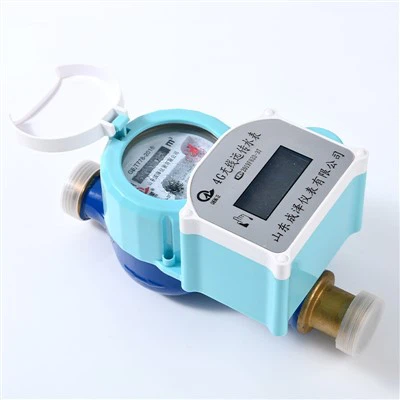
First, let’s start with the basics: Why usage limits matter for IoT water meters specifically, not just any utility monitoring. A lot of people reach out to us saying, “My last bill was $800 over because of a leak I didn’t notice for three weeks.” Others are small business owners with a rental property who want to set a standard usage cap so tenants don’t run the sprinkler for three days straight while on vacation. Municipal clients tell us they need to adjust limits for seasonal changes—like higher caps in summer for outdoor watering, lower caps in winter to prevent frozen pipe leaks from draining supply lines. IoT water meters aren’t just fancy version of old mechanical meters; they send data every 15 minutes (or even every 5, if you need it) to our cloud-based dashboard, so when you set a usage limit, it doesn’t just check monthly—it tracks every hour, every day, and alerts you the second you hit your cap. That’s the magic, and that’s what makes setting these limits so much more effective than old methods.
Now, let’s walk through step-by-step. I’ll use a real example from one of our clients last year, a mid-sized apartment complex in suburban Ohio, to make this concrete. Their maintenance team was spending 10 hours a month chasing leak calls and dealing with tenant complaints about overwatered lawns, so they bought 120 of our IoT remote water meters and wanted to set usage limits for both the whole building and individual units. Let’s break down what we did with them, and what you’d do too.
Step 1: Align limits to your actual usage pattern, not a random number. The first mistake people make is picking a number out of thin air, like “I’ll cap my unit at 500 gallons a month” without checking what their normal usage is. Last month, we had a small café owner in Chicago do that—he set a 2,000-gallon monthly cap on his water meter, which was half of his average usage, and spent the first three days of the month getting alerts that he was over. We fixed that by pulling his historical data from his old mechanical meter (we can import 12 months of usage data from any meter, even non-IoT ones) to establish a baseline. For the Ohio apartment complex, their baseline was 24,000 gallons per unit per month in summer (May through August) and 15,000 gallons in winter, because tenants watered plants and ran sprinklers more when it was warm. We also broke that down into daily limits, so instead of letting a tenant use 10,000 gallons in one day (say, from a broken sprinkler), we set a daily cap of 800 gallons per unit. That way, if a sprinkler breaks at 2 a.m., the meter sends an alert by 6 a.m. when maintenance checks their phone. Pro tip from our customer success team: If you don’t have historical data, run a 30-day “monitor only” period on your IoT water meter first. No limits, just data. That tells you exactly how much you use on average, when you use it most, and where you can realistically cut waste without making your daily routine miserable.
Step 2: Customize alert rules to fit your response time needs. Not all alerts are the same, and one size doesn’t fit everyone. For the apartment complex, we set three tiers of alerts tied to their usage limits, all through our cloud dashboard (you can access this on a laptop or our mobile app, which works on both iOS and Android). Tier 1: Warning at 90% of monthly limit. That’s a gentle nudge—text and email to the property manager, with a note that the tenant has used most of their allocated water, maybe a reminder that it’s peak sprinkler season. Tier 2: Immediate alert at 105% of daily limit. That’s for anomalies, like a broken pipe or a running toilet. The second a unit hits 840 gallons in a day (their cap is 800), the system sends a push notification to the on-call maintenance tech, plus an alert to the property manager. Tier 3: Lockout at 110% of monthly limit. For units that consistently go over their cap, the system automatically sends an alert to the tenant and property manager, and also flags the unit for a maintenance check. We built that lockout feature because the apartment complex had a problem with tenants leaving hoses running on accident—instead of waiting for a $1,000 water bill at the end of the month, the lockout would shut off the unit’s water for 24 hours (after a warning) to give them a chance to fix the issue, then turn it back on. Important note: We let our clients customize these tiers completely. If you’re a small homeowner, you might only want one alert at 100% of your monthly limit, no lockout, because you don’t need to shut off your whole house while you’re away. If you’re a municipality managing a whole neighborhood, you can set a tiered alert for the entire system, so you know when a whole subdivision is approaching its seasonal cap, not just individual homes.
Step 3: Integrate limits with other tools you already use. A lot of our clients don’t want to have to log into a whole new platform every time they need to check water usage. That’s why our IoT remote water meters work with most common utility management, property management, and municipal software. The Ohio apartment complex used Yardi, a popular property management tool, so we integrated their usage limits right into their existing Yardi dashboard. That meant their maintenance team didn’t have to learn a new system—they could see the water alerts right alongside rent payments and work order requests. For a small grocery store client in Denver, they integrated their water usage limits with their energy management system, so when the store was hit with a heatwave, they could adjust their outdoor water limit temporarily to keep their landscaping alive without going over budget. Another client, a small city manager in Iowa, integrated their limits with their public works dispatch system, so when a usage limit was hit in a residential area, the alert automatically sent a work order to the street repair team to check for a main line leak. The key here is that setting usage limits isn’t just a one-time setup on our dashboard—it’s flexible, and we can connect it to whatever tools you already use to run your operations, so you don’t have to add more work to your plate.
Step 4: Test and adjust your limits regularly. Water usage patterns change all the time, so your limits shouldn’t be set it and forget it. The Ohio apartment complex learned this last spring, when they set their summer cap to 24,000 gallons per unit, but that year had record high temperatures and a local water restriction that capped outdoor watering at three days a week. Their original limits meant some units hit their cap halfway through the month, and maintenance was getting 20 extra alerts a day. We adjusted their limits a month later, lowering the outdoor watering allocation for each unit and increasing the indoor-only allocation, which cut alert volume by 70% and kept everyone within the city’s water rules. Our customer success team checks in with all new clients after 90 days to review usage limits, adjust for seasonal changes, and answer any questions. Another example: A small restaurant in Portland changed their outdoor patio setup in the summer, adding more potted plants, so their water usage went up 15%—we adjusted their cap in 5 minutes over a call, no paperwork, no extra fees. The big takeaway here is that usage limits should adapt to your needs, not the other way around. If you set a limit and it’s causing more problems than it’s solving, tweak it. We’re here to help you do that, no hoops.
Now, let’s address some common questions we get when people start setting up these limits, because I know you’re probably thinking a few of these right now. First: What if I have a leak? The usage limit system is designed to catch leaks fast, before they turn into big bills. The average household leak wastes 10,000 gallons of water a month, according to the EPA. With our IoT remote water meters, if you set a daily limit, a leak would trigger that alert within hours, not weeks. We had a client last year, a senior living center in Cleveland, that had a pipe under the cafeteria break room burst at 10 p.m. on a Sunday. The usage limit for the whole facility was set to 5,000 gallons a day, and by 2 a.m., the meter had already alerted the on-call maintenance tech, who was able to shut off the pipe before it caused more water damage. That’s the kind of thing that makes usage limits worth it—you’re not just avoiding bills, you’re preventing property damage and saving water.
Another common question: Can I set different limits for different times of day? Absolutely. A lot of our commercial clients, like laundromats or car washes, use most of their water during business hours, so they can set a higher limit during 7 a.m. to 9 p.m., and a lower limit during overnight hours, when they don’t need to run machinery. A small office building in Austin did this last year, setting a low overnight limit to prevent frozen pipe leaks in winter, which saved them $1,200 in water bills over three months. We’ve also had residential clients set night limits to prevent kids leaving sprinklers on while they sleep, which is a super common issue.
What about if I’m a large municipality managing hundreds or thousands of meters? Our system is built to scale. You can set system-wide seasonal limits, neighborhood-specific limits, and individual property limits all at the same time. You can also set up custom reports that show how much each area is using, which neighborhoods are hitting their limits most often, and where you can target conservation efforts. We work with small towns of 500 people and cities of 500,000 people, so whatever size your operation is, we can adapt the usage limit system to fit.
Now, let’s talk about the actual setup process, so you know what to expect when you work with our team. When you order our IoT remote water meters, we send you a step-by-step guide, and our customer success team is with you every step of the way. First, you install the meters (most installations take less than an hour per meter, no special tools needed—we can walk you through it over a video call if you’re doing it yourself, or connect you with a local installer if you prefer). Once the meters are installed, we help you import your historical usage data, set your baseline, and customize your alert tiers and limits. We’ll do a test run for the first month, reviewing data with you every week, and adjust anything that’s not working. At any point, you can log into your dashboard or our mobile app to change limits, turn alerts on or off, or check your usage in real time.

At the end of the day, setting up usage limits on an IoT remote water meter isn’t about restricting you from using water— it’s about giving you the tools to use water smarter, without the headaches of manual checks or surprise bills. Whether you’re a small homeowner looking to cut waste, a property manager trying to avoid tenant complaints, or a municipal administrator working to meet conservation goals, our team is here to walk you through every step. If you’re ready to learn more about setting up usage limits for your space, we’d love to talk through your specific needs and show you how our IoT water meter systems can work for you. Reach out to our team today to start your conversation about remote water meter setup and usage limit customization.
Wired Remote Water Meter References:
United States Environmental Protection Agency. (2023). Water Efficiency Best Practices for Commercial and Residential Properties.
IoT Analytics. (2024). Global IoT Water Meter Market Report.
National Fluid Machinery Association. (2023). Smart Meter Usage for Municipal Water Conservation Programs.
Property Management Association of America. (2024). Technology Solutions for Reducing Utility Costs in Multifamily Housing.
Shandong Chengze Instrument Co., Ltd.
We’re well-known as one of the leading iot remote water meter manufacturers and suppliers in China, featured by quality products and good service. Please rest assured to buy high-grade iot remote water meter for sale here from our factory. Also, customized service is available.
Address: No.7, Wensi Road North Industrial Park, Liguan Town, Lanshan District, Linyi City, Shandong Province, China
E-mail: czwatermeter@163.com
WebSite: https://www.cz-watermeter.com/
