If you’ve ever tapped your smartphone screen to send a text, pinched your tablet to zoom in on a map, or swiped your smartwatch to skip a song, you’ve relied on a touch panel—one of the most underappreciated pieces of tech in everyday devices. As a touch panel supplier, I work with engineers, product designers, and small business owners daily, and the question I get more than any other isn’t about pricing or lead times: it’s how this thin, unassuming layer turns a light tap into a command that a device can understand. Touch Panel

Let’s break this down simply, no jargon overload. At its core, a touch panel is a transparent surface that detects where a finger (or stylus) is touching it, then sends that exact location to your device’s processor. But how it does that depends on the type of touch panel—capacitive, resistive, infrared, or surface acoustic wave. For most modern devices, including smartphones, laptops, and interactive kiosks, the workhorse is the capacitive touch panel, so that’s what I’ll focus on here.
First, the basics of how capacitive touch works. Ever rubbed a balloon on your hair and seen it stick? That’s static electricity, right? Our bodies are full of conductive materials—water and salts in our skin create a tiny, constant electric charge. A capacitive touch panel is built with a grid of ultra-thin, transparent conductive electrodes, usually made from a material called indium tin oxide (ITO, though we’re starting to switch to flexible alternatives like silver nanowires for bendable devices). This grid is sandwiched between two thin layers of glass or plastic, and it’s coated with a hard, scratch-resistant outer layer to protect it.
When your bare finger touches the panel, it draws a tiny, predictable amount of that electrical charge from the electrodes. The panel’s controller chip—essentially the brain of the touch system—senses this change in capacitance (capacitance is a material’s ability to store electrical charge) at the exact spot your finger touched. Wait, but how does it know not just where you’re touching, but that it’s a touch, not just your palm brushing the side of the device? That’s where the grid comes in. Most capacitive panels have a dual-layer grid: one layer has horizontal electrodes (called rows), the other has vertical electrodes (columns). Where a row and column cross, you get a tiny capacitor. When you touch the panel, you create a disturbance at that intersection. The controller measures the change in capacitance at every intersection, then maps those changes to a coordinate pair (x, y) that tells your device exactly where you tapped.
This is why you can tap a screen to open an app—your finger’s charge disrupts the tiny capacitor at the app icon’s location, the controller picks up that change, sends the coordinate to the processor, and the processor runs the command to open the app. Multi-touch, the ability to pinch to zoom or swipe with two fingers? That’s even simpler for the grid. The controller can pick up multiple capacitance changes at the same time, matching each change to a separate finger, which lets it interpret gestures like moving fingers closer (pinch to zoom out) or apart (pinch to zoom in), rotating fingers (to turn a photo), and even the difference between a light tap (a click) and a longer press (to pull up a menu).
Resistive touch panels are less common these days, but they’re still used in some industrial devices, point-of-sale terminals, and older tablets. Resistive panels have two thin, conductive layers separated by a tiny gap (usually made of clear plastic dots). When you press the panel, the two layers touch at the point of pressure. The controller measures the voltage at that touch point to determine the location. Resistive panels work with styluses, gloves, even a fingernail, which makes them useful for outdoor or industrial use where gloved users might need to interact with the screen. The downside is they’re less scratch-resistant and less clear than capacitive panels, so most consumer devices switched to capacitive once battery life and display quality improved.
Now, as a touch panel supplier, I see a lot of engineers get confused about the difference between a touch panel and a display. A touch panel is just the input layer; it sits on top of the display (like your phone’s OLED or LCD screen). Some modern devices have “in-cell” or “on-cell” touch panels, where the touch electrodes are built directly into the display layer itself, which makes the whole device thinner and brighter. But I still work with a lot of clients who build rugged industrial kiosks, medical devices, or automotive infotainment systems that use separate touch panels paired with external displays, because they need more durability or customization for harsh environments.
A common question I get from new clients: why does my touch screen sometimes work poorly? There are a handful of reasons, almost all tied to the panel’s design or installation. If the screen is unresponsive when your hands are sweaty or you’re wearing thick gloves, that’s often a capacitive panel limitation—your finger’s charge is too weak or blocked, so the controller can’t pick up the capacitance change. That’s why we offer modified capacitive panels with higher conductivity for medical users who wear latex gloves, or water-resistant coatings for outdoor kiosks in rainy climates. If the screen jitters or misinterprets taps, that’s usually EMI (electromagnetic interference) from nearby devices, like power cables or Wi-Fi routers. To fix that, we shield the touch panel’s inner layers with a thin metal film to block interference, something we do for all our automotive clients who deal with high-EMI engine bay electronics.
Another point that’s key for clients building custom devices: touch panel size and input type. We make panels as small as 1 inch (for smart watches) up to 98 inches (for digital signage), and we offer customizations like cutouts for cameras or sensors, anti-glare coatings for outdoor use, and even stylus compatibility. For stylus use, we build active stylus panels that can detect 2,048 levels of pressure—so a designer can draw a thin line with light pressure and a thick line with hard pressure, just like a pen on paper. That’s a big difference from older passive styluses, which only register a tap.
Let’s talk about quality control, because that’s where a good touch panel supplier stands out. Every panel we make goes through three rounds of testing before it leaves our factory. First, we test the transparency: a panel needs to be at least 90% transparent so the display underneath is bright and clear. We check every electrode grid for defects—even a tiny gap in a row or column can cause a dead spot on the screen. Then, we test durability: we scratch the outer layer with steel wool to meet 3H hardness (standard for consumer devices) and 5H for industrial use, drop the panel from 1 meter onto concrete, and test it in temperatures from -20°C to 60°C to make sure it works in cold warehouses or hot desert climates. Finally, we test touch accuracy: we use a robotic stylus to tap 1,000 points across the panel, checking that every tap is registered within 1mm of the target.
I recently had a client who was building a line of outdoor smart parking kiosks. They were using a cheap touch panel from another supplier, and the screens would stop working after a month in the Florida sun. When they reached out to me, I walked them through the problem: the cheap panel didn’t have UV protection, so the ITO electrodes were degrading in sunlight, causing capacitance changes to become inconsistent. We swapped them for our UV-resistant capacitive panels, and now their kiosks have a 99% uptime rate, even after two years of installation. That’s the kind of problem-solving that matters for our clients, not just selling a standard panel.
Another common misconception: touch panels don’t actually process commands—they just detect touch. The hard work of turning a tap into a command is done by the device’s processor and software. The touch panel just sends a signal that says, “There’s a touch at x: 120, y: 350” to the operating system, which then checks if that point is a button, an app icon, or a text field, and runs the corresponding action. That’s why if you’re troubleshooting a screen that won’t respond, sometimes the issue isn’t the panel—it’s the software or the device’s processor.
Looking ahead, I see a lot of demand for flexible touch panels now, as foldable phones and wearables become more popular. Flexible panels use silver nanowires instead of ITO, because ITO is brittle and cracks when bent. We just launched a line of flexible 7-inch panels that can be folded 100,000 times without losing touch sensitivity, perfect for foldable smartphones and rollable displays. We’re also working on haptic touch panels, which give you physical feedback when you tap the screen—like a slight vibration or a click, even though the screen is just a flat surface. That’s a game-changer for automotive infotainment, where drivers want a physical feel for tapping a button without taking their eyes off the road.
At the end of the day, a touch panel is so much more than a glass sheet with a grid on it. It’s the bridge between a user and a device—whether you’re a grandma tapping a tablet to video chat with grandkids, a nurse using a medical device to pull up a patient’s records, or a designer using a stylus to create a logo. As a touch panel supplier, our job isn’t just to sell a part—it’s to make sure that bridge is reliable, responsive, and customized to fit what our clients need.
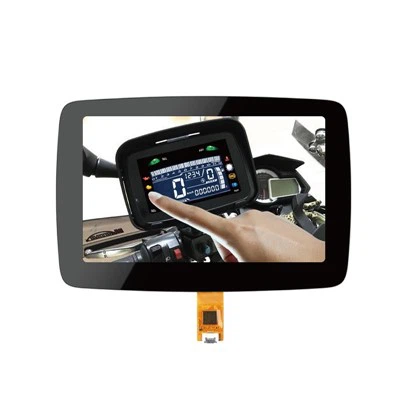
If you’re building a device and need a touch panel that works for your use case, whether it’s a small wearable, an industrial kiosk, or a large digital sign, reach out to our team to discuss your requirements. We’ll walk through options, customization, and testing to make sure your touch panel performs exactly how you need it to.
Bar Type Capacitive Touch Screen References
Capacitive Touch Technology Basics. (n.d.) Display Supply Chain Consultants.
Resistive vs. Capacitive Touch Panels: Key Differences. (n.d.) Electronics Weekly.
Flexible Touch Panels for Foldable Devices. (2022) Journal of Display Technology.
EMI Shielding for Touch Panels in Industrial Environments. (n.d.) Industrial Electronics Magazine.
Shenzhen Mingqi Photoelectric Co., Ltd.
We’re well-known as one of the leading touch panel manufacturers and suppliers in China, featured by quality products and good price. Please rest assured to buy bulk customized touch panel from our factory. Welcome to view our website for more information.
Address: 3rd Floor, Building A, Fufang Science and Technology Park, Xintian Community, Fuhai Street, Baoan District, Shenzhen, Guangdong
E-mail: mingqisales@gmail.com
WebSite: https://www.mq-screen.com/
